
ROG Crosshair X870E Dark Hero USB A ports Question
 stealth1111
Canada Member
stealth1111
Canada Member
in Hardware
So i have a small question about my USB A ports for the ROG Crosshair X870E Dark Hero
i have 9950X3D with 5080
so when i do Quest 3 TEST
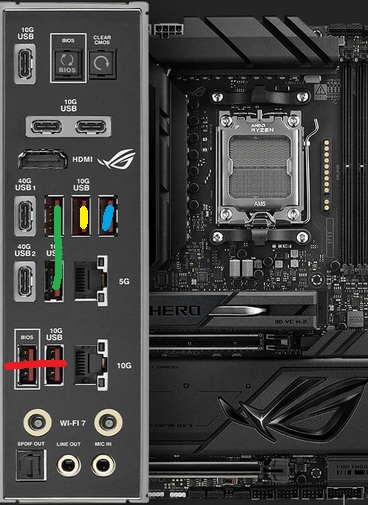
Red Line only dose 256 MB Speed
Green dose 1.8 Gbps
Yellow dose 1.6 ~ 1.7 Gbps
Blue dose 2.5 Gbps
and there all 10G Ports???
Why is there only 1 FAST usb A port?? im confused O.o is there something Wrong in the Bios?
"i Did Not use the M.2 Slot that shares with the USB ports" <-----
0
Comments
IIRC, sometimes some ports are connected directly to the CPU and some are connected via chipset due to limitation of lanes. You'd need to check the manual to see/confirm which port is connected directly to the CPU.
totally stumped as well. The user manual says only the 40G ports get affected by m2 settings so all 10G USB ports should be able to get a lot closer than that.
I have a similar thing on my MSI motherboard, a single red USB port that I honestly could never really get working properly.
Then I installed Linux instead of Windows and the port works flawlessly and I use that for my external HDD for my backups. Probably not helpful except to say that maybe checking to make sure you're using the correct chipset drivers instead of the built in Windows ones might change something.