
To talk on Icrontic, just register!

It only takes 30 seconds.

Have an account? Sign in:

Forgot?
 
Reply to Discussion Options
drasnor
124 Golden Eye Drive
drasnor
2,292 Posts

Cooling the MSI Master2 FAR

It's got dual Opterons and a non-standard (for AMD) heatsink mount.

From GamePC.com:
What MSI has done, apparently, is NOT used AMD's standard Socket-754/940 heatsink retention system, opting to use a Pentium 4-style (!!) heatsink retention system instead. What this means is NO standard Athlon64/Opteron heatsink will work on this motherboard, not even the AMD retail coolers. Not only does MSI include the incorrect mounting brackets, but they do not leave the necessary motherboard holes if one wanted to change out to the correct mounting system.

On the plus side though, one could use any number of Pentium 4 coolers on the market for use on the K8T Master2 motherboard, but we can imagine most (if not all) potential buyers of this board will be confused by the cooling situation.

Update : We've just been informed that using Pentium 4 coolers, such as the ones included on the MSI K8T Master2-FAR motherboard, voids the warranty on AMD Opteron retail CPU's. Keep in mind, this is only on retail packaged CPU's, OEM CPU's determine warranty breaks in different ways which is up to each OEM distributor. Still, we thought it was interesting and well worth mentioning.
I had originally planned to water-cool this platform, but that didn't fly real far financially with the folks and given a choice between a bigger case and water cooling or dual Opteron 250's, that was an easy choice.

In any case, now I need to select a pair of Socket478 coolers for this board. My criteria are:
Must use the Intel HSRM or Intel Xeon thru-board mount holes.
Must fit entirely within the space outlined by the Intel HSRM.
Must perform better than the Intel stock 3.0+GHz HSF.
Must be no louder than 40dB (the quieter the better).
Must not look hideous.
EDIT: Pretty sure they're not AMD mount holes, try Xeon.
You'll probably see what I mean about size restrictions if you look carefully at this photo
(source: newegg)

I've found one HSF, the AVC SunFlower2 HSF, that seems to meet all of my criteria.
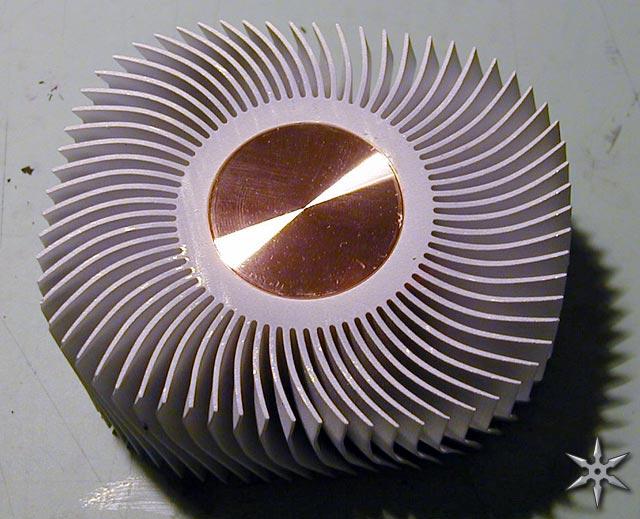
(source: ninjalane)

I'm open to suggestions if y'all have 'em. I'm still using my stock Intel cooler on my P4 (too lazy to change it), so I'm pretty inexperienced in this department.

-drasnor
__________________ [folding_sig2]


shwaip
elaborate bot
shwaip
5,734 Posts
Will the slk-800u fit on that board?
__________________ my photostream for ic photography challenge

Anyone who wants dropbox, please use my referral link
Geeky1
No comment.
Geeky1
7,972 Posts
Base on the AVC is too small, I think.

Two Thermalright SLK-900Us will probably fit if you use 70 or 80mm fans.
__________________ -MCCCXXXVII
"Ignorance is forgivable. Stupidity is inexcusable."

Resident Dual CPU Addict: 3 working duallies, 2 more in the parts drawer, and looking to add an Opteron dually to that list as soon as I can find a good motherboard...
shwaip
elaborate bot
shwaip
5,734 Posts
Geeky1, I was looking at that...I think the fins may be oriented the wrong way for them to fit on there. (basically, they'd overhang the AGP slot)
Geeky1
No comment.
Geeky1
7,972 Posts
Not on a P4 system; AFAIK, they mount lengthwise on the P4, with the edges of the fins facing the mounting brackets.
shwaip
elaborate bot
shwaip
5,734 Posts
from this pic, it looks like a 900u may not fit...altho, this was the about only pic I could find on the 'net.
Attached Thumbnails
Click image for larger version

Name:	musketier.jpg
Views:	1842
Size:	35.2 KB
ID:	4201  
croc_
No sleep
croc_
1,132 Posts
geeky, if you look at those brackets, the mounting slots for the clips are facing towards the AGP slot, meaning it would hang over that edge. At least thats how it looks, I could be wrong.
__________________
Athlon64 3800+ X2 @ 2.7GHz / 270x10
DFI LP Ultra-D
2x1GB G.Skill PC4000 (UCCC) 1:1 3-4-4-8
BFG 7800 GTX OC 256MB 500/1350
Seasonic s12 600w
36GB raptor
200, 160, 120, 120 GB HD's
Benq DW1640 DL DVD-R
SB Audigy 2
Sennheiser HD580
shwaip
elaborate bot
shwaip
5,734 Posts
drasnor, are the mounting holes on the mobo intel or amd mounting holes?


edit:

This may be another option. It seems to perform well on p4 CPU's
http://www.svc.com/vanaerp4tmdc.html
TheLostSwede
Where's the ****ing beers?
TheLostSwede
3,212 Posts
Would you be able to remove those Intel plastic things?

If so, two Swiftech MCX4000 would fit brilliantly. The choice between 70-92mm fans is a plus as well. 3.14"W x 3.5"L x .375"H
Attached Thumbnails
Click image for larger version

Name:	4000.jpg
Views:	1815
Size:	29.0 KB
ID:	4202  
__________________ ...
drasnor
124 Golden Eye Drive
drasnor
2,292 Posts
They look like AMD mount holes, but I'm not sure. I'm assuming AMD because they seem to be far too close together (one socket width on the short dimension) to be Intel holes. I'll keep looking for information though.

None of the Thermalright HS will fit because they interfere with the AGP slot. If they were rotated 90 degrees, they would have been perfect, but they all have the mount clips on their long dimension as pictured above.

-drasnor
edcentric
Must keep folding
edcentric
2,480 Posts
The 800u is smaller than the 900u.
But those mounting brackets look very close.
Good luck, with Intel mounting holes this could be a trick.
__________________ A couple of folding boxes;

DFI LP Nf4 U-D, A64X2, 2GB ram, is folding again
MSI P965 Pt, C2D E6300, 2GB ram, old reliable

2.5 million points and counting
drasnor
124 Golden Eye Drive
drasnor
2,292 Posts
I've been checking out some other motherboards, and I think it looks like MSI used the Intel Xeon hole spacing.

(source: newegg)

-drasnor

Drasnor, your image was bringing up a login prompt from Newegg. Had to remove it.
drasnor
124 Golden Eye Drive
drasnor
2,292 Posts
Any thoughts on using the Swiftech MCX603?


-drasnor
shwaip
elaborate bot
shwaip
5,734 Posts
Have you tried firing off an e-mail to MSI?
drasnor
124 Golden Eye Drive
drasnor
2,292 Posts
They don't have an address for technical questions. They have a RMA request form, a website suggestions e-mail, and a sales/distribution e-mail. I looked on their support forums, which have a thread on K8T Master2 cooling and it's like MSI employees don't even browse. I figure if they can't get an answer from MSI on MSI's own forum, I haven't got a prayer.

-drasnor
shwaip
elaborate bot
shwaip
5,734 Posts
Tech support e-mail:
support@msi.com.tw

Online tech support form
http://www.msicomputer.com/msiforms/...desc_form2.asp
Geeky1
No comment.
Geeky1
7,972 Posts
MSI's tech support is OUTSTANDING, IMO. Try the address shwaip just posted;

Regardless, the swiftech heatsinks are excellent, but due to the fact that they have very tight pin spacing, they apparently don't generally do well in low-noise/low flow applications
drasnor
124 Golden Eye Drive
drasnor
2,292 Posts
Okay, here's what I sent.
I'm considering purchasing a MSI Master2 FAR motherboard for use in my next computer, and I would like to use my own cooling solution. Before I can do that, I need to know if the heatsink retention mechanism featured on the board conforms to any particular standard (Intel Socket478-compatible, Intel Socket603 compatible, etc.) and whether the hole spacing for this mount conforms to any standard like that found on some performance Socket A boards, Intel Socket478 boards, or Intel Socket603 boards. Thank you.
-drasnor
drasnor
124 Golden Eye Drive
drasnor
2,292 Posts
BTW, I scaled out some Xeon boards in MS Photo Editor and the hole spacing on the short dimension matches that on the MSI board. I don't have another view of the MSI board, so I can't scale the long dimension.

-drasnor
drasnor
124 Golden Eye Drive
drasnor
2,292 Posts
Does this constitute a real response? It's been a week, and this is all I got.
To our Valued Customer,

?

Thank you for purchasing & supporting MSI product.

?

This E-mail is an automatic reply which is to notify you that you have reached?HYPERLINK "mailto:support@msi.com.tw"support@msi.com.tw

?

In order to give you an overall technical support, we have listed some common problems and solutions for your reference.

Please take time to read the useful FAQ which we have compiled from the technical support e-mails we have received as link and see if it helps the problem you are facing.

?

http://www.msi.com.tw/html/service/main.htm

?

?

?

We hope the directions below answer your question. If your?problem still cannot be solved after going through all the suggestions,?then you can reply this e-mail?containing the automatic reply?with your?original e-mail. We will get back to you as soon as?possible.

?

I. Read the Manual

Most users have tendency not to read the manual under the presumption that they already know what is written in there. However, we have seen that there are percentage of technical support calls & e-mails as a result of not reading the manual

?

II. Keep your MSI CD drivers

MSI CD drivers provide easy driver installation via auto-run. Losing it would require you to install driver manually

?

III. Contact your Reseller

Your reseller or the store/company that sold the motherboard or system to you should know well what your system contains & have the necessary resources to help you in your problem. Since they can see your system clearly, it is easier for them to identify if your problem was caused of wrong installation or wrong assembly or defective product, etc. It would be advisable to contact your reseller for those having problems like system cannot power on or need to send board for repair

NOTE: there is a tiny percentage that the board might be defective & by contacting your reseller at an earlier time prevent your warranty being voided. Some resellers provide certain period of time for return/exchange, after that you have to either send the board to them for repair or you are on your own.

?

IV. Check our website

Some of the information you are looking for might be already posted in our website

?

V. Search in MSI Forum

Your problem might have encountered by another user in the forum or you might find answer in the Good Article forum with a lot of useful posts written by moderators & power users. You can also post a message there to get help

?

VI. Read the FAQ

Attached Link is a list of useful FAQ which we have compiled from the technical support e-mails we have received http://download.msi.com.tw/support/dvr_exe/user.exe

?

?

Best Regards,

MSI Technical Support

~~~~~~~~~~~~~~~~~~~~~~~~~~~~~~~~~~~~~~
Please include your original mails when replying!!
Reeaal helpful.

-drasnor
TheBaron
Veteran Icrontian
TheBaron
2,777 Posts
it says reply with the original email. i'd say do that, OR call them on the phone and bitch until you get past the supervisor's supervisor to someone who knows what they're talking about
drasnor
124 Golden Eye Drive
drasnor
2,292 Posts
I went hunting for better photos for scale purposes.

They say a picture is worth a thousand words.

-drasnor

Tyan Tiger i7505 (S2668) dual Xeon motherboard scaled up to 525% (source: Tyan)
MSI K8T Master2 dual Opteron motherboard scaled up to 400% (source: MSI)
I matched their back dimension and ATX hole positioning before zooming in on the processor sockets to ensure a match.
Attached Thumbnails
Click image for larger version

Name:	msi.jpg
Views:	1428
Size:	101.4 KB
ID:	4418  
mmonnin
Veteran Icrontian
mmonnin
10,545 Posts
That is one crappy move my MSI. Why in the world would that do that? Forcing everyone to void waranty or do something better than air or mod it.
__________________ Stanford Team Stats_____________Team Short-Media
Statsman Team Stats______________EOC Team Stats
drasnor
124 Golden Eye Drive
drasnor
2,292 Posts
Shrug. My only b!tch is that the price tag on the Swifties is $64 for the MCX603 non-rev2 non-V sink. The V is too big and the rev2 uses clip mounts, while the original uses through-hole mounting.

It's not like anyone makes a decent Opteron HSF anyway. If you buy OEM processors, the warranty is 30 days. I guess they were thinking they would make life easier on everyone by using a HSF mount that has lots of alternatives for cooling. BTW, since the HSRM accepts socket478 sinks and bolts into Xeon holes, I bet I can use these on a Xeon board to mount socket478 sinks. Besides, if the board eats my CPU's, I bet I can b!tch out MSI and make them replace them.

I forgot to mention that the board ships with a pair of reaaaally loud CoolerMaster Socket478 copper HSF's.

-drasnor
drasnor
124 Golden Eye Drive
drasnor
2,292 Posts
In light of the Swiftech Xeon coolers costing a LOT, I had another look at the stock HSF's that come with the board. They are made by CoolerMaster and have the same base as the Aero4, but an off the shelf AVC fan on top. Feedback in the MSI forums say it's ridiculously loud, so I'm thinking about using Panaflo's on it instead.

-drasnor
drasnor
124 Golden Eye Drive
drasnor
2,292 Posts
Ok, I've got the board and system assembled. Here's the scoop:

The thru-hole mounts are indeed Intel Xeon hole configuration, which also happens to be the same as Socket423. Most Xeon HSF's come with heatsink retention mechanisms, so that isn't an issue. However, the only real decent Xeon cooler I found that met the not hideous requirement is the Intel Xeon stock sink w/ windtunnel, and unfortunately for me I don't have enough space to mount the fan on its side, and it'll probably be about as good as the MSI stock sinks if I mount the fan on top, so that option is out.

The MSI stock sinks are pretty loud and they aren't matched. The one down by the AGP slot is offset to allow lots of room by the graphics card, though cooling suffers. The other one is friggin loud. Everything is made by AVC. MSI does have this feature where the MB fan headers are 7V modded in the BIOS, then flip up to full speed if the core temp exceeds 60 C. The sinks are tolerable in this configuration, but the core temps are around 50-52 C, and these are $1000 processors so that really isn't acceptable.

No one sells MCX603 rev1 or rev2 heatsinks. They've been discontinued and are long gone. Instead, I looked around for Swiftech sinks with similar properties so I can mod them, and found the MCX462+. It's essentially the same sink, though the base has much less material removed around the edges. You'll notice that on the MCX603 it looks like they just took the MCX462+ and milled out all the copper around the raised up portion to the same level as the corners on the MCX462+. The "universal bracket", $3 extra with each sink you order, allows bolting the sink to any Socket423 or Socket478 motherboard, though limits you to 70mm fans. I took a look at the placement of the 80mm fan mounts and the Socket423/Socket603 holes on the universal bracket and it looks like I'll still be able to use 80mm fans if I knock off the Socket478 part of the bracket with my tin snips. You'll notice that the mount holes for extra mount hardware are in the same position on both, but the spot is occupied by an aluminum plate on the MCX603.


MCX462+ (3"x3"x1.66", 650g) and universal bracket.


MCX603 (3"x3"x1.66", 510g) and thru-motherboard bracket

CrazyPC was having a sale on MCX462+, so I ordered 2. I've got a couple RPM-sensing Panaflo H1A's on my desk just waiting for the Swifties to get in. I'll post a follow up when I get everything in and assembled. It should go fairly easily, since MSI put a massive steel plate behind each CPU socket with tapped inserts for the thru-motherboard holes. It looks like I'll be able to use Swiftech's screws in MSI's holes, meaning I won't have to pull the computer apart to install these.

-drasnor
keto
SM22 Host
keto
1,829 Posts
which opterons did you get? nice potential - tell us about the rest of the system and its intended usage?
__________________ i'D rAthEr HAvE a fULL bOttLe iN fRonT oF ME tHan a fULL FrONtaL lobOtomy
drasnor
124 Golden Eye Drive
drasnor
2,292 Posts
The system is sitting on my desk right now, and except for the heatsinks and floppy drive cable it's in its final configuration:

Motherboard: MSI K8T Master2-FAR
Processor(s): 2x AMD Opteron 248 @ 2.2GHz, 1MB L2 cache
Memory: 1GB (2x512MB) Corsair TwinX PC3200RE-LLPT DDR400, 2-3-2-6 @ 2.65V
Graphics: ATI All in Wonder 9700 Pro 128MB
Chassis: Lian Li PC-7 w/ all Panaflo H1A fans.
NIC: Integrated Broadcomm gigabit LAN w/ boot ROM.
Storage: 2x Western Digital Caviar 160GB/8MB drives in RAID0 using SATA->PATA bridge boards and VIA Southbridge SATA RAID, 1x Western Digital SE 250GB/8MB for backing up the array.
Sound: Creative SoundBlaster Audigy 2 Platinum
PSU: Antec TruePower EPS12v 550W, partially sleeved.
Optical Drives: Sony CRX300E 16x DVD, 48x24x48 CD-R/RW. Sony DW-U14A 4x2 DVD+/-R/RW, 24x16 CD-R/RW, 32x8 CD read/DVD read.
Other:
Internally-mounted ATI Remote Wonder
Internally-mounted Atech Flash Pro-9 USB2 multi-reader/writer.
3.5" floppy drive.
5.25" floppy drive w/ blue activity LED.
USRobotics 56k V.92 hardware PCI modem.
ALi-chipset USB2 adapter on PCI.

This is going to be my primary desktop and workstation at school, and it's going to last me for at least four more years without any significant upgrades (more RAM if needed to run Longhorn). I'm studying to be an aerospace engineer, so I'll be developing software for controlling aircraft and spacecraft, doing AutoCAD, possibly doing some computational fluid dynamics work, and simulating orbital constellations (satellites orbiting in formation). Additionally, it's going to take care of all my day-to-day stuff like surfing the internet, chatting, and gaming. I plan to use it occasionally for video capture and encoding. Right now it has Windows XP Professional (32-bit), but in a couple weeks it will also have Gentoo Linux with an A64 kernel and at an undetermined time in the future Windows XP 64-bit edition.

It also folds 24/7.

-drasnor
Omega65
EPoX Evangelist!
Omega65
2,891 Posts
Dual Opteron 248.... You Da Man!


__________________ Moderator: System Core Forum - Got a question??...shoot me a PM

Dell E1705 Core Duo 1.66ghz 1GB X1400 100GB
DFI NF4 SLI-DR - Opty 170 @ 2.5ghz - 7900GT - 2GB Corsair PC4400 Pro - Raptor 74GB
Abit AV8 - X2 4400+ @ 2.5ghz - 2GB G.Skill PC4000 - Raptor 74GB

Heatware: Omega65 150-0-0
Ebay Feedback Omega365 62-0-0

Athlon 64 Comparison: 12 CPUs - Single vs Dual Channel - 512K vs 1MB Cache
drasnor
124 Golden Eye Drive
drasnor
2,292 Posts
Dual Opteron 248.... You Da Man!


Thank you!

Heatsinks came in yesterday, and the modding went fairly smoothly. I have no idea what these brackets are made out of, except that it isn't aluminum and isn't iron-bearing and isn't cut by my steel razor saw. No problem for the reinforced cutoff wheel on the Dremel though. I think the melting point is kind of low, since friction from the cutoff wheel got the piece I was cutting off to glow red.

The standoffs Swiftech uses are English threads, some UNC series. MSI uses 3mm metric threads in the holes around the socket, so I had to buy a new die and cut 3mm threads onto the Swiftech standoffs. That went fairly smoothly, I broke one standoff but Swiftech gives you an extra. Getting the broken standoff out of the die was a pain, so watch it when your die bottoms out against the standoff.

I don't have temps yet, so bear with me. It's certainly a lot quieter than with the stock sinks, and I'm hoping the very thin layer of Arctic Silver 5 will cool better than the thermal pads bundled with the stock sinks. I'll let you know once it's all warmed up.

-drasnor
drasnor
124 Golden Eye Drive
drasnor
2,292 Posts
Ok, temps are 51C and 46C for processor 1 and 2. Keep in mind that processor 1 is physically directly above processor 2 and that kinda makes sense. This is with two instances of FAH running. BIG improvement over stock sinks, which ran at 58C and 51C respectively. Don't know why these run so hot.

-drasnor
TheBaron
Veteran Icrontian
TheBaron
2,777 Posts
that seems pretty reasonable from what i know about opteron temps. hope everything stays good to go
Omega65
EPoX Evangelist!
Omega65
2,891 Posts
Ok, temps are 51C and 46C for processor 1 and 2. Keep in mind that processor 1 is physically directly above processor 2 and that kinda makes sense. This is with two instances of FAH running. BIG improvement over stock sinks, which ran at 58C and 51C respectively. Don't know why these run so hot.

-drasnor
Those are probably Thermal Diode Temps.

My Athlon MP 2000+ 256K (1.66ghz) are at 50C running FAH, so be impressed with the Opteron 248 1MB 2.20ghz.
primesuspect
The Icrontic Guy
primesuspect
27,818 Posts
I think drasnor wins the "sweetest short-media rig" award for the hour
__________________ "I offer my genius to the world, all I ask is you pick up my expenses"
drasnor
124 Golden Eye Drive
drasnor
2,292 Posts
I think drasnor wins the "sweetest short-media rig" award for the hour


It really is. Just wish the All in Wonder would work right. ATI keeps sending me busted ones for warranty service.

-drasnor
Geeky1
No comment.
Geeky1
7,972 Posts
Drasnor, I'm looking at recommending this board to someone who's looking for a DV workstation. Let me see if I understand this correctly:

The brackets for the heatsinks will take standard P4 heatsinks that clip onto the brackets, but the hole spacing for the brackets is the same as for the Xeons, right?
drasnor
124 Golden Eye Drive
drasnor
2,292 Posts
That's correct, though my board only came with one set of brackets (for the top CPU only). Other people have gotten board with two sets of brackets, though YMMV. In either case, the board comes with heatsinks that are either matched and are loud, copper-finned P4 heatsinks or one is like that and the other is weird-looking and quiet, though doesn't cool particularly well.

-drasnor
Justice
Getting settled in
Justice
5 Posts
Apologies if this thread is old, and if I've posted this somewhere else, but I am really really curious.

What do you guys think about installing two of these on the MSI K8T Master2?

http://www.systemcooling.com/aerocool_ht101-01.html

Thanks
Geeky1
No comment.
Geeky1
7,972 Posts
Won't work on the board.
Justice
Getting settled in
Justice
5 Posts
Okay, why not?
Enverex
~-+-~
Enverex
5,852 Posts
Also, that board basically attaches the GFX card to the side of one of the processor heatsinks. I bet thats really good for cooling.
__________________ RetroTracks - Classic Computer and Game Music
Geeky1
No comment.
Geeky1
7,972 Posts
Okay, why not?
Heh... Sorry. I was being lazy last night... didn't want to type out an explanation

The Aerocool attaches to the board by bolting through the motherboard if you use the P4 clip. The MSI board has Xeon hole spacing, not P4 spacing. Sooo, the heatsink won't fit.
Justice
Getting settled in
Justice
5 Posts
Hmmm... By looking at this picture


I see the X bracket (P4) -- You're telling me that won't work? Damn!

I was actually more worried about the HSF sitting on top of the AGP card...

Okay then, so what about Thermaltake's solution?
http://www.thermaltake.com/coolers/c...ilentTower.htm

S478, Socket T, K7 & K8, @ 21 db...

Looks like the clip has a variety of holes too, so perhaps it would fit the MSI too, even though it says S478 only...


What's socket T anyway?
drasnor
124 Golden Eye Drive
drasnor
2,292 Posts
The Master2 FAR supports heatsinks with a maximum footprint of 80mm square. Anything larger will interfere with the AGP slot on the lower processor and the other processor HSF on the upper processor. I really ought to take photos of how close they are in my system.

Enverex, you're probably right about GFX card cooling, but there's not a whole lot of space to play around with when you're shoving dual Opterons onto an ATX board. I mean, my Northbridge is right in front of my AGP slot, and all the IDE and floppy hookups are at the southeastern most point on the board. My All in Wonder 9800 Pro works at stock speed with the stock cooler, so I'm happy.

-drasnor
Geeky1
No comment.
Geeky1
7,972 Posts
The thermaltake one will not work either. No Pentium 4 heatsink that bolts through the motherboard will work, period. Any bolt-on heatsink has to be a Xeon heatsink, any clip-on heatsink has to be a P4 heatsink.
drasnor
124 Golden Eye Drive
drasnor
2,292 Posts
Okay, since I've gotten requests for photos of how I attached these, here they are. These were taken using my webcam because I don't have access to a digital camera at the moment, so I apologize for the quality. On the plus side, using the webcam afforded some unique angles.


This is the top processor (CPU 0), taken with the machine powered on. You get a good view of where I cut off the extra metal from the optional s423 modules for the MCX462+. Just a reminder, these cuts are only required if you want to use 80mm fans instead of 70mm fans.

MSI has a large metal plate behind each CPU socket with threaded inserts coming out of the board. The end of the inserts don't sit flush with the surface of the board, so I added a flat washer at each hole for strain relief purposes. You can kinda see the washers here, sandwiched between the modded Swiftech standoffs and the board. The Swiftech standoffs had to be modified because they use an English thread on their standoffs while MSI's threaded inserts are 3mm metric threads. Luckily, it's a simple procedure to cut the right threads onto the standoffs.


You can see pretty clearly in this shot that there isn't much clearance between the AGP card and the processor heatsink when using 80mm fans. It isn't a problem for me since I don't have anything sticking out the back of my card. Note that there is enough room for RAMsinks if that's your thing.

You get a great view of the modded retention mechanism here. It's just a metal plate with a few holes in it that screws into the heatsink base and has springs pushing it into the board. I believe the thru-board mount sold as an accessory for the MCX603 will work here without modification, but the ones I used were cheaper.

The amber "MSI DDR" heatsink on the right is right on top of the K8T800 northbridge. Yes, the northbridge is really underneath the graphics card.

Post any questions you have here or PM me.

-drasnor

P.S. Here's the mod I had to do to my Lian Li PC-7 to get dual processors not to melt the case. I thought it came out quite nicely.
Attached Thumbnails
Click image for larger version

Name:	back.jpg
Views:	1110
Size:	117.0 KB
ID:	8568  
Adam2-FAR
Getting settled in
Adam2-FAR
5 Posts
Drasnor, do you think there's any way the V version of the MCX603 would fit on this board, and if not, do you think there's any way to make it fit on this board? Its angled pins cause it to exceed the 80mm limit, so I foresee it overhanging the AGP slot. It's flat on one side to allow two of them to sit side-by-side, and the other side is rounded and sticks out past the fan about 9mm (I think). Would the rounded side touch the top heatsink if the flat side of the bottom one was faced down toward the AGP? Can you get me a measurement on how far apart your fans are? Any info is appreciated.
TheBaron
Veteran Icrontian
TheBaron
2,777 Posts
he's a camp counselour at a boyscout camp for most of the summer, so he won't be able to give you those measurements until at least the end of this month (he may have a break for a couple days at some point). just letting you know

on the plus side, I'm sure his machines are diligently folding away in his absence
Adam2-FAR
Getting settled in
Adam2-FAR
5 Posts
Well, I guess we'll do this the old-fashioned trial-and-error way. I'll let you guys know how it turns out.
drasnor
124 Golden Eye Drive
drasnor
2,292 Posts
There is a 1cm +/- 1mm gap between my two 80mm processor fans. There's 2mm between my lower fan and my AiW Radeon 9800 Pro. If you cut off the outer layer of pins, it ought to work.

SVC has MCX462+'s in stock though, so I wouldn't get the V's unless they were just a lot cheaper.

-drasnor
Go Back   Icrontic Forums > Tech: Hardware > Mods & Cooling
Jump to
This Thread Search this Thread
Search this Thread:

Advanced Search


Current time: 10:25pm (GMT)
Powered by vBulletin®
Copyright ©2000 - 2009, Jelsoft Enterprises Ltd.
Get Vanilla instead. Trust me.